
Resource policies
Define tool, MCP, command, and gateway policies, group them into policy bundles, and control which resources they cover. Test rules, stage rollout, and review approvals and decisions.
A resource policy defines what may happen on one kind of resource. A policy bundle groups those policies into a baseline and defines where the group applies. For example, a production bundle can combine database read-only rules, MCP call restrictions, agent shell rules, and model output redaction. The rules live in its member policies; the bundle supplies shared coverage and rollout settings.
Choose a policy type
| Type / YAML root | Resources | Rule sections |
|---|---|---|
tool_policy | Platform tools, such as databases and hosts | commands, sql |
mcp_policy | MCP servers and composite proxies | access, tools, arguments |
command_policy | Agents and supported developer machines | commands, tools, filesystem, network |
gateway_policy | LLM gateways | input, output |
A tool policy checks the command or SQL submitted through a platform tool. A command policy checks an agent's own shell and harness tools. MCP policies control server access, tool names, and call arguments. Gateway policies inspect prompts and responses routed through a gateway. Each type can also use semantic rules when enabled.
Use the root key for the resource you intend to govern. Sections belonging to another type are dropped during parsing and reported by lint. For example, a network: block in a tool policy enforces nothing; it belongs in a command policy.
Create a resource policy
- Open the resource's Policies tab and create a policy of its type.
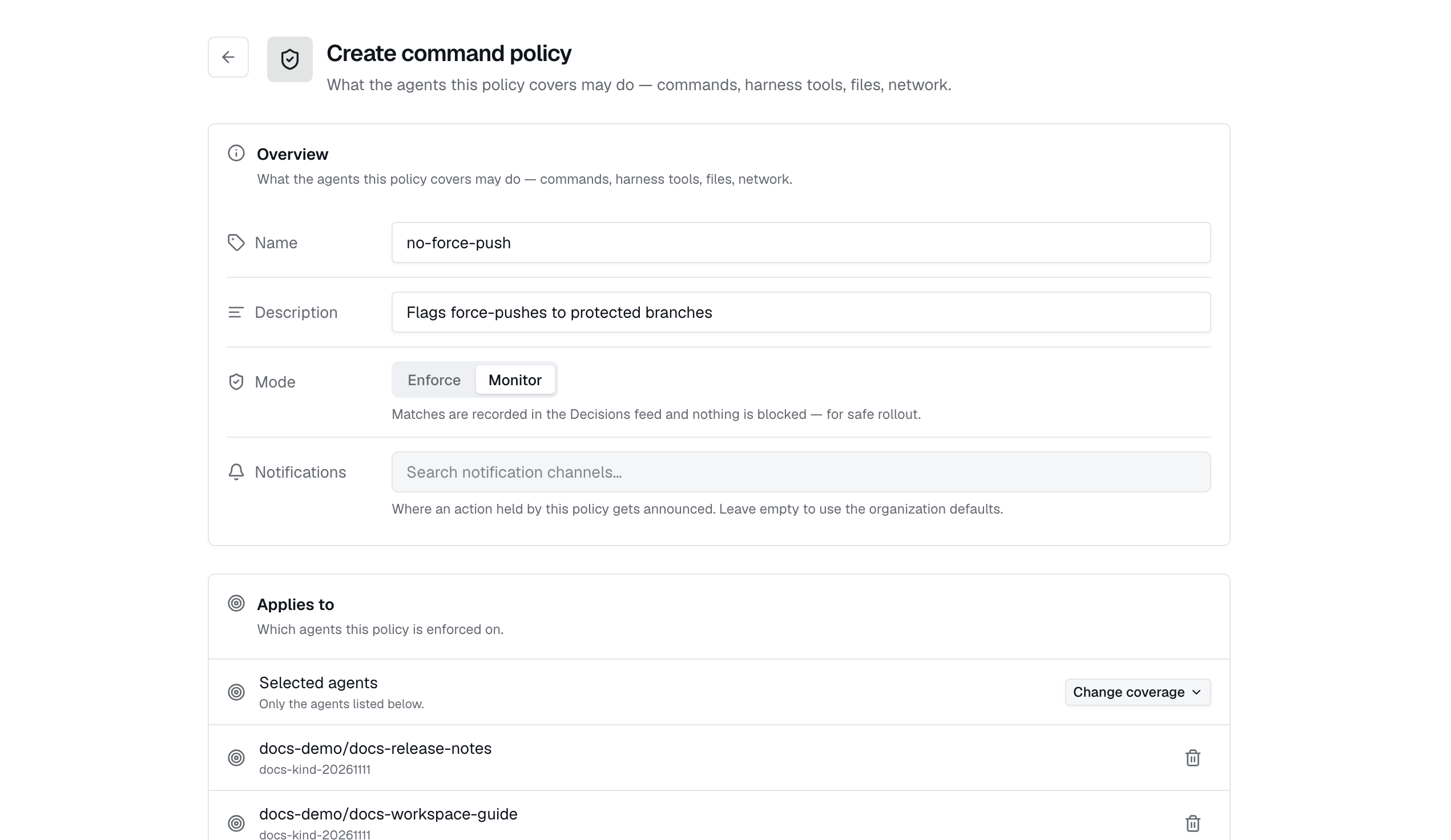
- Name it, describe its purpose, and choose Monitor for an initial rollout.
- Write rules in the form or YAML editor, then review which resources it covers and who it applies to.
- Save the policy, then use its Test this policy panel to try representative allowed and denied actions.
A command policy document
1command_policy:2 name: safe-shell-baseline3 default_decision: allow4 commands:5 deny:6 - pattern: "sudo **"7 reason: "Privilege escalation is blocked."8 - pattern: "curl ** | sh"9 reason: "Remote script execution is blocked."10 require_approval:11 - pattern: "npm install **"12 reason: "Dependency installation changes the environment."13 filesystem:14 write:15 deny:16 - "/etc/**"17 - "**/.ssh/**"Command patterns are case-insensitive, start-anchored globs: both * and ** match across /, and ? matches one character. Reasons explain matches to the agent and in the audit record. These patterns match command text; filesystem rules inspect supported file-tool actions. Neither is an operating-system sandbox.
The CLI selects the policy type from the YAML root. An independently created typed policy starts unbound unless you pass --all or --bind, or later give it coverage through a bundle:
exo policy lint -f safe-shell.yaml
exo policy create -f safe-shell.yaml --bind <agent-id> --mode monitor
exo policy list --type command
exo policy create -f ./policies -R --update --all --mode monitor
exo policy delete <policy-name-or-id>
Reading policies requires policies:read; creating and editing requires policies:write. Deletion has its own permission, policies:delete.
Group policies into a bundle
Open Policies and choose Create policy bundle. Give the bundle a name, select existing resource policies, and choose coverage separately for tools, MCP servers, agents, and gateways. You can also start from a policy template: review the typed members it creates and any omitted sections before saving. Templates cover controls such as shell safety, database read-only access, Kubernetes restrictions, and secret detection.
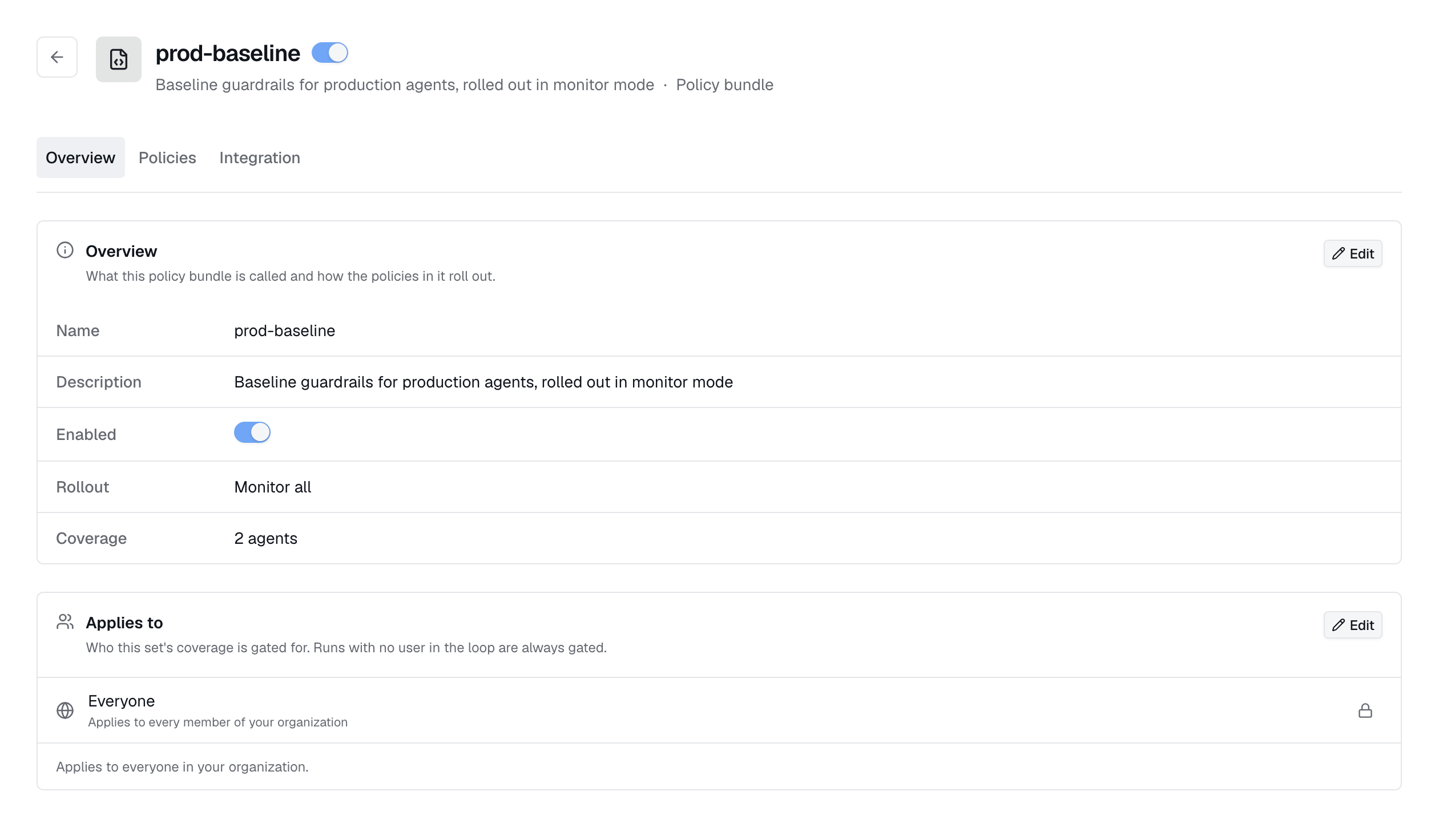
On a saved bundle, Overview contains its enabled state, rollout, and user assignments. The Policies tab contains its members and resource coverage; Integration contains its evaluation hook and tokens.
To author a whole bundle in a file, put typed members under policies::
1runtime_policy:2 name: production-baseline3 description: Production resource controls.4 policies:5 - tool_policy:6 name: production-database-readonly7 sql:8 default_decision: allow_readonly9 - mcp_policy:10 name: production-mcp-safety11 tools:12 deny:13 - pattern: "*:delete_*"14 reason: "Deletions require a separate workflow."15 arguments:16 "*:*":17 deny_if:18 - contains: [secret]19 reason: "Do not send credentials to an MCP server."20 - command_policy:21 name: production-shell-safety22 commands:23 deny:24 - pattern: "sudo **"25 reason: "Privilege escalation is blocked."26 - gateway_policy:27 name: production-output-redaction28 output:29 redact_if_contains: [secret]30 covers:31 tools: [production-database]32 mcp: [production-mcp]33 agents: [production-agent]34 gateways: [production-gateway]Replace the example resource names with your own. YAML coverage accepts names or IDs, all for all current and future resources of a kind, or none. A member with no coverage of its kind will not enforce on any resource. Do not mix top-level legacy rule sections with the policies: list.
exo policy lint -f production-baseline.yaml
exo policy create -f production-baseline.yaml --mode monitor
exo policy list
Inline members are owned by the bundle: removing an owned member deletes it, and deleting the bundle deletes its owned members. Selecting an independently created policy only groups it. Removing that reference leaves the policy intact, and it can belong to several bundles. A policy owned by one bundle cannot be added to another bundle.
Coverage and assignments
Coverage answers what is protected. A policy can cover all resources of its kind, have explicit bindings, or inherit coverage from an enabled bundle. These paths add together. A command policy can further narrow its apply-to-all agent coverage with metadata labels; every label pair must match. Its user_machines setting also includes supported local coding agents.
Assignments answer whose actions are checked. The Applies to user, team, and role selection narrows applicability. No assignment grants means everyone. Runs without a user remain subject to the rules; a scheduled or headless run does not escape enforcement because there is no person to match.
Use the resource's Policies tab to see whether coverage is direct, applies to all resources, or comes from a named bundle. Only direct bindings can be detached there. Change inherited coverage in its bundle, and change apply-to-all coverage in the policy editor. The policy Coverage page helps find resources with no policy coverage.
An agent can also opt into a bundle by name in spec.bootstrap.policies. It receives that bundle's command and MCP members, with the bundle's rollout mode. This does not bind tool or gateway policies to resources the agent happens to use; set their coverage explicitly. Editing agent policy mappings requires the operator's map-policies capability.
1spec:2 bootstrap:3 policies:4 - production-baselineRoll out in monitor mode
A resource policy in monitor mode records matches without blocking or redacting. In enforce mode, its decisions take effect. Across applicable enforcing rules, the most restrictive result wins: deny → require_approval → redact → allow.
| Bundle rollout | Effect on coverage granted by that bundle |
|---|---|
| Per policy | Each member uses its own mode. |
| Monitor all | Record matches without blocking or redacting. |
| Enforce all | Enforce the members regardless of their individual modes. |
sudo in Enforce mode. You then add that policy to a bundle set to Monitor all. The agent still blocks sudo because its direct assignment remains in Enforce mode. To preview without blocking, change the directly assigned policy to Monitor too.Start with Monitor all, exercise the actual resource paths, and review matches and false positives in Decisions. Switch to Enforce all once the results match your intent.
Test a policy in the dashboard
Use Test this policy to see how a resource policy would handle a sample action. You can run these checks directly in the dashboard.
- Open a saved resource policy and select Overview. If you are viewing a bundle, open the member policy you want to test.
- In Test this policy, choose the input type and enter a sample. The available inputs depend on the policy: a command or SQL statement, an MCP call and its arguments, a file path, a network request, or model input or output text.
- For a policy in Monitor mode, select Show what it would block if enforcing to preview enforcement without changing its saved mode.
- Click Test and review the decision, matched rules, reasons, and any warnings. Try both an action you expect to allow and one you expect to block or send for approval.
For example, test sudo cat /etc/shadow against the shell policy above. The result should be Deny because it matches the privilege escalation rule. Test pwd to check an allowed command.
Tests use the current rules, including unsaved edits, without executing the action or adding a Decisions entry. They can also preview disabled policies. After testing, check resource coverage and assignments, then review real traffic in Monitor mode to confirm the policy is being applied.
The Policy rules editor also reports validation issues, including sections that belong to a different policy type and would be dropped. Resolve those warnings before relying on the rules.
Rego and semantic rules
Tool, MCP, and command policies can use Rego modules through their typed editor or API. Define a decision document using the OPA decision contract. Gateway policies do not accept Rego because the gateway has no Rego evaluator on its request path. The CLI routes plain .rego files through the legacy API, so use the typed editor or API when creating a typed Rego policy. Saved Rego modules are not synchronized to developer machines.
When System One is enabled on the control plane, all four types can add a semantic: decision graph backed by a configured System One provider. Judgment nodes supply signals, AND/OR nodes combine them, and outcome nodes allow, deny, or require approval. Gateway graphs cannot require approval. Semantic checks run in policy tests and the saved policy's Integration evaluation hook; they are not compiled into the in-pod or gateway matcher. A caller must use the hook for those judgments to affect its actions.
Approvals
On a path that supports human approval, require_approval holds the action and adds a request to Policies → Approvals. Review the command, resource, policy, rule, and originating agent where available. policies:view_approvals permits viewing the queue; deciding requires policies:approve. Pending requests expire after ten minutes by default.
For CLI tool execution, the command waits and prints an approval link as a QR code. Approval lets it proceed; denial or timeout aborts it with a reason. Ctrl-C cancels the pending request.
Approval notifications
Configure approval notifications in Policies → Configuration. Connected channels can notify a Slack channel or direct message, a Microsoft Teams channel or chat, or a phone via Twilio call or text. Approvers can decide directly from supported Slack and Teams messages.
Decisions
Policies → Decisions shows recorded matches, including the enforcement point, policy and rule, subject, and outcome. Use it to explain a block, review approval outcomes, and see what monitor-mode rules would have stopped. One action may have several records because multiple enforcement layers evaluated it. Coverage and decisions answer different questions: which resources have policies, and which rules actually matched.
Integration hooks
The Integration tab on a resource policy or bundle provides its evaluation URL and tokens. Creating tokens requires policies:write, and plaintext is shown only on creation. Send the token as Authorization: Bearer <token> or X-Exo-Policy-Token. Use the URL shown for that policy; the resource-policy and bundle endpoints are different.
For a typed policy, the hook evaluates its saved rules and mode and records matches in Decisions. The response includes a decision and matched verdicts; redaction also returns transformed output. Your caller must honor that response. Calling the hook does not execute or block an external action on its own.
On your own machine
Enable user_machines on a command policy to include supported developer machines, then synchronize it with exo policy sync. This can coexist with agent coverage. The local files and runtime wiring depend on the detected harness; file and network checks require a harness that exposes those actions to the policy hook.
exo policy create -f safe-shell.yaml --all --user-machines --mode monitor
exo policy sync --dry-run
exo policy sync --runtime claude
exo policy sync --local --prune
exo sync
--local writes project-scoped configuration; --prune removes stale Exo-managed files. The Claude hook uses live control-plane validation by default. --local-validation selects validation against synchronized policy files instead. Review the actual harness path before relying on local enforcement.
Check the actual execution path
Industric checks tool actions on the server, with extra checks on supported connectors, hosts, and ECS setups. Recording a terminal session does not mean every keystroke is checked against policies. MCP proxy rules apply only to calls sent through the proxy. If a proxy rule asks for approval, the call is currently blocked without sending an approval request.
Gateway rules apply only to requests sent through that gateway. An agent that connects directly to a provider with an API key skips these checks. Once streamed output is sent, it cannot be taken back. Prompt instructions and guardrails do not replace these checks.