
Skills
Write reusable instructions for agents and sync them to your machine.
What a skill is
A skill is a SKILL.md file with a name, description, and instructions. Store it in Industric for agents to load at session start, or download it with exo skill sync.
Create a skill
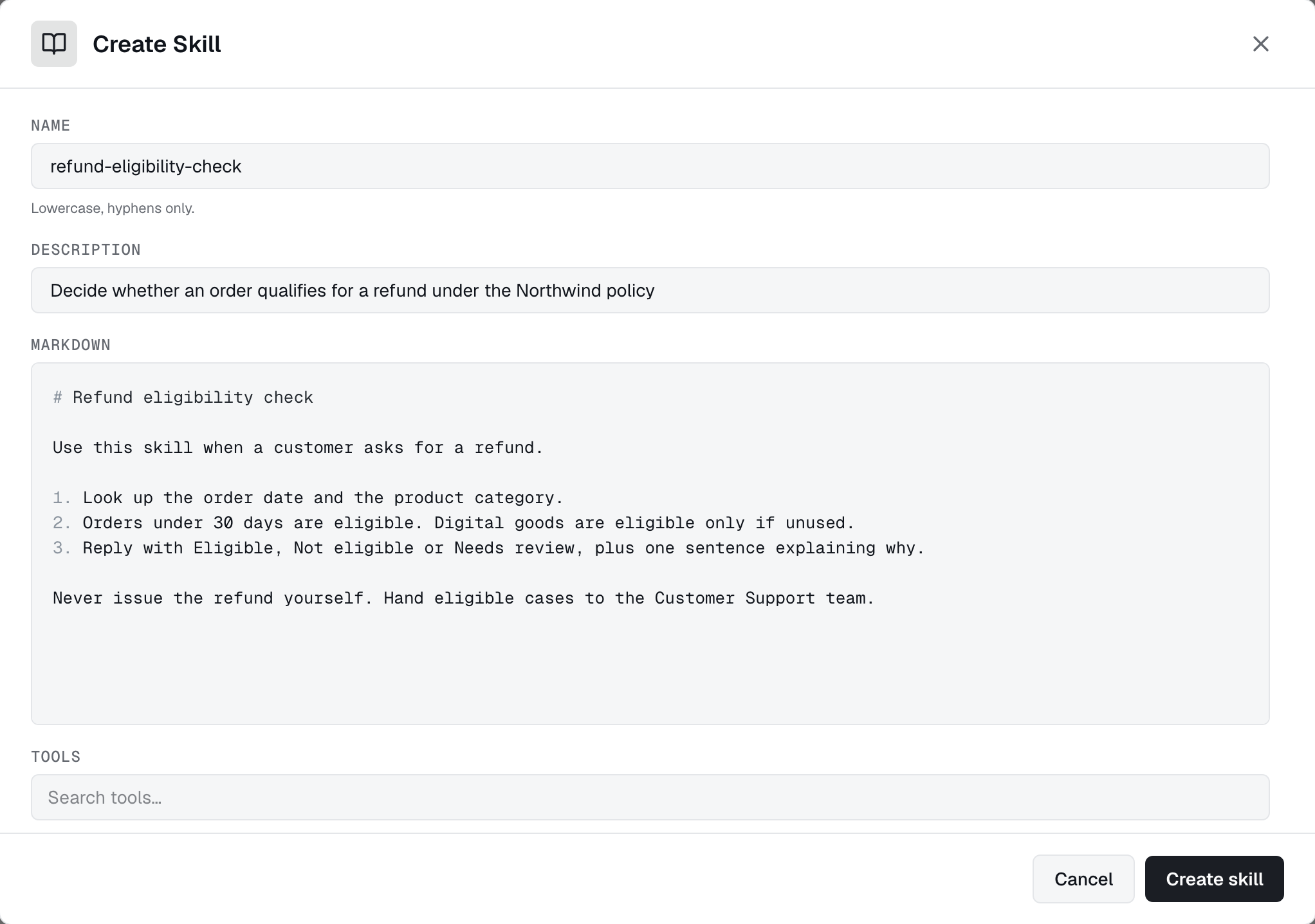
Open Agents → Skills. Enter a name, short description, and Markdown instructions. You can also use the CLI or API:
exo skill list
exo skill create --from-file triage-runbook.yaml
exo skill update <id> --from-file triage-runbook.yaml
exo skill get <id>
generated_by_ai flag. Skills generated from tool templates have a source marker. Manually written skills have neither.Add skills to agents
Add skills to spec.bootstrap.skills. Agents load them at each session start, so edits apply on the next run without a redeploy:
1spec:2 bootstrap:3 skills:4 - triage-runbook5 - review-checklistUse a catalogue name, a ConfigMap (configMapRef: { name }), or inline content (inline: { name, content }).
Sync to your machine
Run exo skill sync --runtime=claude to install skills for your local agent. Sync tracks its files and preserves manually written ones. See --prune, --dry-run, and layouts in Skill Sync.
Access
You can read and sync skills you own or have access to. Administrators and users with skills:admin manage access from the skill's dashboard row. skills:write does not grant access to every skill.