
Multi-Agent
Keep terminals running as you browse, refresh, or work with several agents at once.
Agent and tool terminals keep running when you leave the page. The session minimizes, and work continues in the background.
The dock
Leave a terminal page to minimize it to a tab at the bottom of the screen. Each tab shows the runtime icon and session name. Output keeps streaming. Click a tab to return. After six tabs, older ones move into the +N menu.
Right-clicking a tab offers End session and Close all.
End a session
Click ✕ on a tab to end its session. Leaving the page or minimizing the terminal keeps it running.
Refresh the page
Refreshing reconnects to the same session, keeping your output, running commands, and shell state. Sessions end when you close them or the server clears them after an idle timeout.
Beast mode
With two or more terminals open, click Beast mode beside the tabs to view them in a grid. Drag the dividers to resize each terminal.
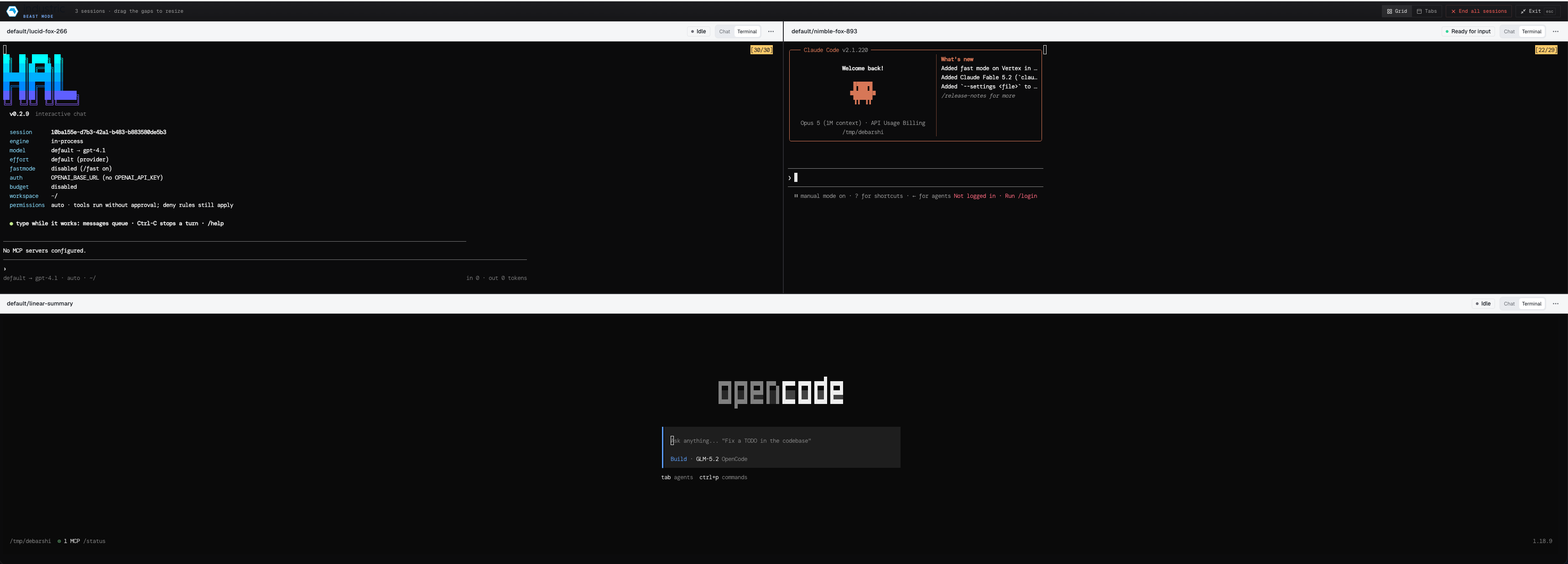
Choose Tabs to view one session at a time. Others keep running. Exit Beast mode to return them to the dock, or choose End all sessions to stop them.
Run tabs
Agent runs have status tabs showing running, waiting for input, done, or failed. Dismissing a tab does not cancel the run. Reopen it to see the full history.