
Access control
Control who can view, edit, or connect to agents.
Two layers
Your role determines what you can do. The agent's access rules determine whether you can do it on that agent. Both checks must pass.
Private vs shared
- Private: Owners and anyone granted access can use the resource.
- Shared: Grants access to all users or all agents.
To restrict a shared resource, remove its shared grant and grant access to specific people, teams, roles, or agents.
Access levels
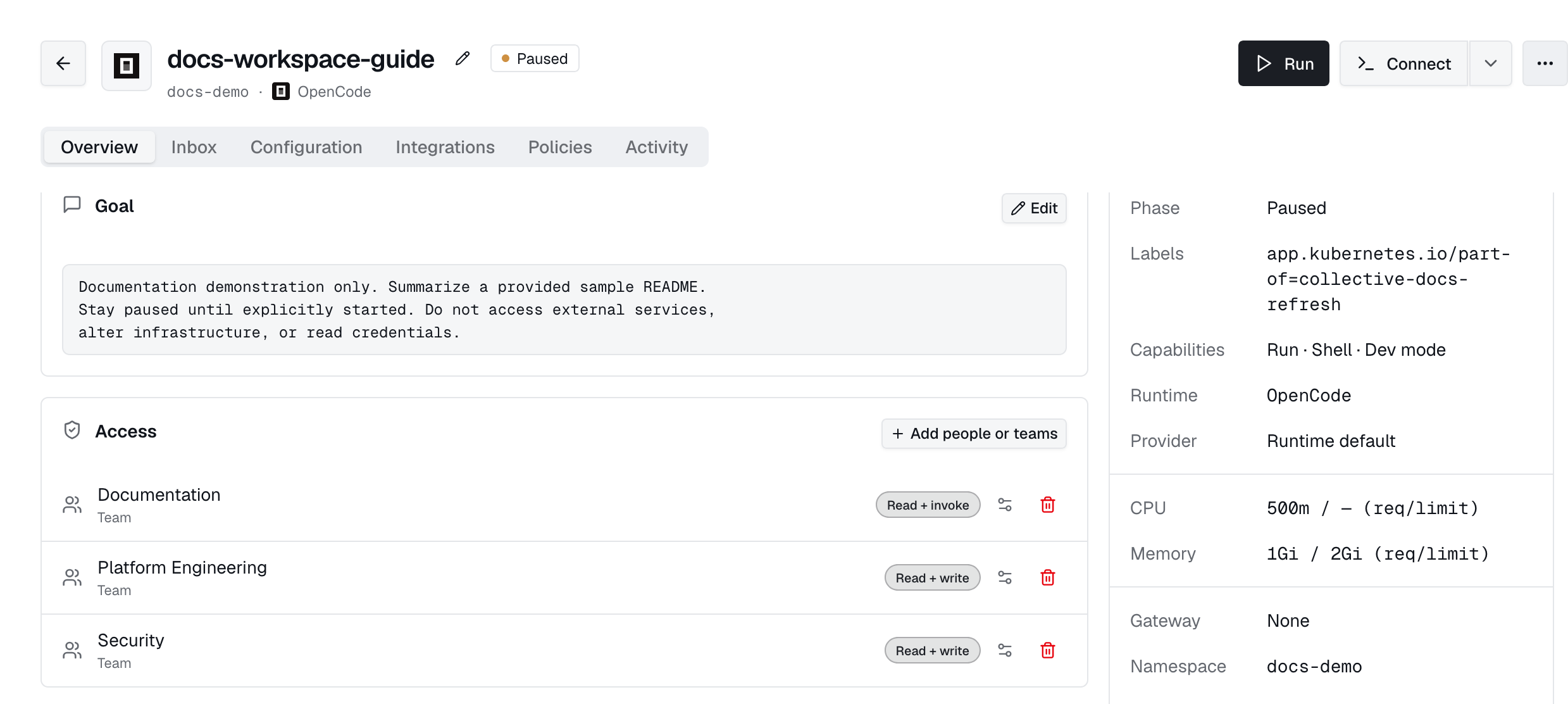
Each grant carries three independent levels. None implies another; a principal ends up with everything granted across every entry that matches them.
| Level | What it admits |
|---|---|
read | List the resource, open its detail page, see it in pickers. Discovery, not use. |
write | Change it: edit, delete, rename, enable or disable, pause. |
invoke | Use it: run, connect, exec, chat, stream, proxy. |
New grants start as read-only; add invoke for anyone who should actually use the resource, including agents calling a tool. Levels never widen RBAC: the role permission is still required, the level narrows what it reaches.
Grant & revoke
Use the Access panel to share levels you already hold. Revoking a grant requires resource write access, its access-management permission, or an administrator. Grants managed by a cluster resource must be changed at their source.
Require MFA
Any agent, tool, or file system can additionally demand a fresh MFA check before it is used: the Require MFA to invoke toggle at the bottom of the Access panel. When the workspace already enforces MFA tenant-wide the toggle shows as required and cannot be loosened per resource.
Permission matrix
Selected permissions are listed below. Admin has all system permissions. Member can read and invoke agents and apps, and read, write, and invoke workflows. Use the Roles page for the current catalog and custom roles.
| Permission | What it gates | Admin | Member |
|---|---|---|---|
users:read | See team members & pending invitations | ✓ | — |
users:invite | Invite new members | ✓ | — |
users:write | Edit or remove members | ✓ | — |
roles:read | View roles & their assignments | ✓ | — |
roles:write | Create/edit roles and assign permissions | ✓ | — |
idp:read | View identity providers (SSO / SCIM) | ✓ | — |
idp:write | Configure identity providers | ✓ | — |
teams:read | View tenant-authored teams | ✓ | — |
teams:write | Create/edit teams & membership | ✓ | — |
agents:read | See agents (subject to access lists) | ✓ | ✓ |
agents:invoke | Attach to and run agents | ✓ | ✓ |
agents:write | Edit the Agent CR | ✓ | — |
agents:admin | Manage per-agent access lists; bypass ABAC visibility | ✓ | — |
apps:read | View apps | ✓ | ✓ |
apps:invoke | Use apps | ✓ | ✓ |
workflows:read | View workflows | ✓ | ✓ |
workflows:write | Edit workflows | ✓ | ✓ |
workflows:invoke | Run workflows | ✓ | ✓ |
policies:view_decisions | View policy decisions | ✓ | — |
usage:purchase | Purchase additional usage | ✓ | — |
deployments:read | View Industric Operator deployments | ✓ | — |
deployments:write | Manage deployments & tokens | ✓ | — |
deployments:delete | Delete deployments | ✓ | — |
sessions:read | Inspect session transcripts & tool calls | ✓ | — |
sessions:write | Checkpoint / resume sessions | ✓ | — |
audit:read | Read the audit streams | ✓ | — |
audit:export | Export the audit streams | ✓ | — |
events:read | Read the platform activity / event stream | ✓ | — |
sandboxes:read | View code sandboxes | ✓ | — |
sandboxes:write | Create / edit sandboxes | ✓ | — |
sandboxes:invoke | Run code sandboxes | ✓ | — |
sandboxes:delete | Delete sandboxes | ✓ | — |
tools:read | View the Cluster Tools catalogue | ✓ | — |
tools:write | Manage Cluster Tools | ✓ | — |
policies:read | View resource policies and bundles | ✓ | — |
policies:write | Manage resource policies and bundles | ✓ | — |
policies:delete | Delete resource policies and bundles | ✓ | — |
policies:view_approvals | See pending approval requests | ✓ | — |
policies:approve | Approve or deny held commands | ✓ | — |
integrations:read | View Slack / Jira / Adaptive integrations | ✓ | — |
integrations:write | Manage integrations | ✓ | — |
oauth_apps:read | View OAuth Apps | ✓ | — |
oauth_apps:write | Manage OAuth Apps | ✓ | — |
providers:read | View LLM provider gateways | ✓ | — |
providers:write | Manage LLM providers & credentials | ✓ | — |
tenant:read | View tenant settings | ✓ | — |
tenant:write | Edit tenant settings | ✓ | — |
skills:read | View the Skills catalogue | ✓ | — |
skills:write | Manage Skills | ✓ | — |
mcp:read | View MCP servers | ✓ | — |
mcp:write | Manage MCP servers | ✓ | — |
memory:read | View agent memory | ✓ | — |
memory:write | Manage agent memory | ✓ | — |
Visibility & permissions
Grants record who granted access (granted_by) and when (granted_at). See Roles & permissions for the permission catalogue and how teams differ from IdP groups.