
OPA integration
Connect your Open Policy Agent server to control tool runs, VM and Kubernetes shells, MCP delivery, and LLM gateway traffic. Your policies stay on your network.
Use your existing Open Policy Agent policies alongside Industric's resource policies. In enforce mode, an OPA deny blocks the action.
How does it work?
Before a gated action runs, Industric asks your OPA server whether to allow it, then follows the answer. Your policies stay in OPA. Industric never copies or syncs them.
The Industric operator inside your deployment handles the request over your own network. It sends OPA's answer back to Industric through its existing connection.
- OPA can stay private. No public endpoint needed.
- No Whitelisting required. Requests come from inside your deployment.
- Audit log. OPA's request logs show each query and when it arrived.
Your operator must support OPA queries. See step 1 below for update instructions.
Connecting it to Industric
Start with a running OPA server. If needed, follow the OPA quickstart.
- Update the operator if needed. In your deployment's connect dialog, run the Update the connector commands or follow the upgrade guide. Saving the OPA connection prompts you if an upgrade is required.
- Select OPA. Go to Providers → Integration → Security → Open Policy Agent.
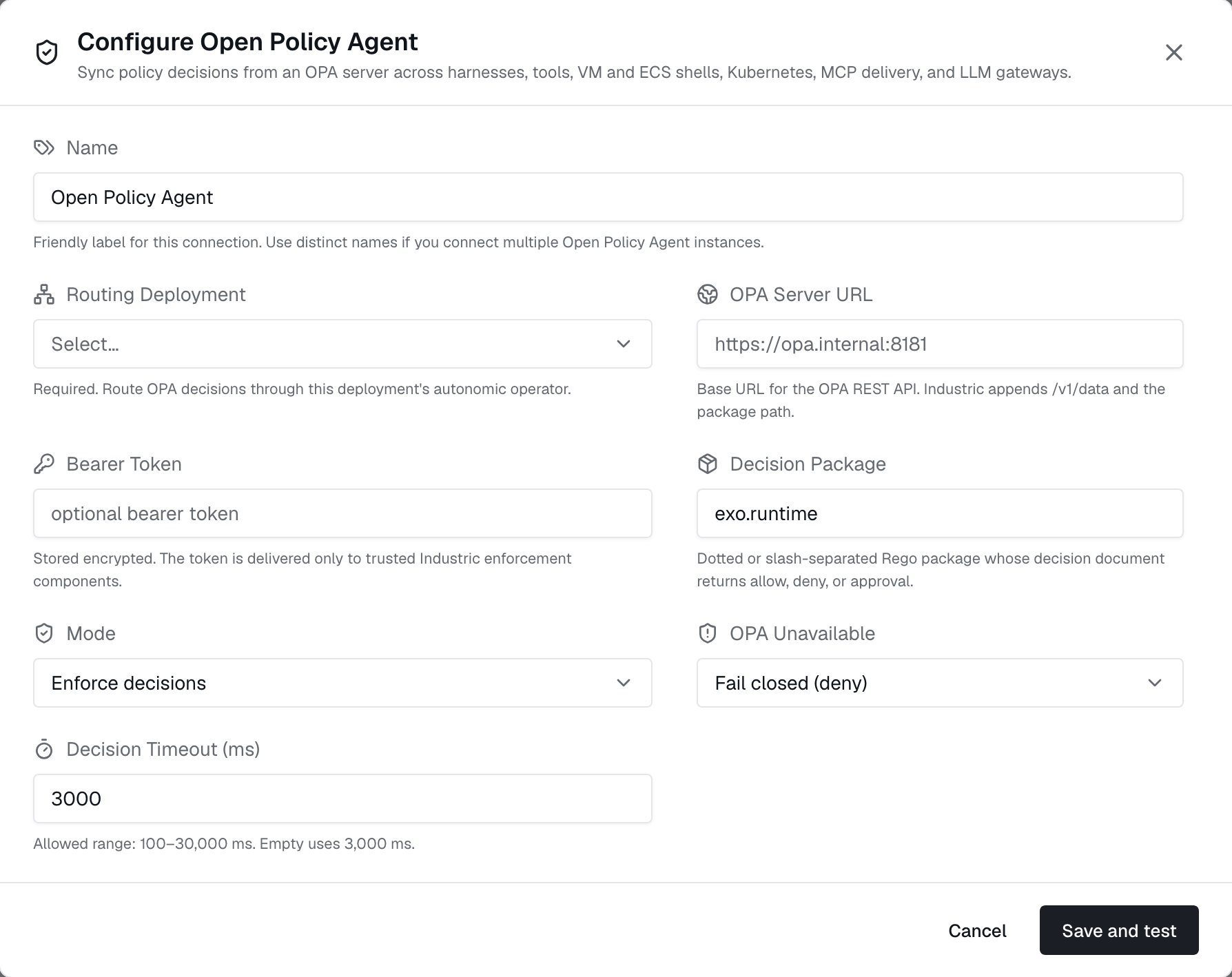
- Enter your connection details and save. Use the fields below.
| Field | What it is |
|---|---|
| OPA Server URL | OPA's base URL, reachable from your deployment. Private URLs work. Industric adds /v1/data/<package>/decision. |
| Routing Deployment | Required. The deployment that sends platform queries to OPA. The connection applies to all deployments in the workspace; each operator checks its own shells directly. If this deployment goes offline, platform checks use the OPA Unavailable setting. |
| Bearer Token | Optional. Sent with each query, stored encrypted, and shared only with Industric components that check policies. |
| Decision Package | Rego package to query. Default: exo/runtime; exo.runtime also works. This package can import and combine other policies. |
| Mode | Monitor logs decisions without blocking. Enforce applies them. Start with Monitor. |
| OPA Unavailable | Block gated actions if OPA is unavailable (fail closed, default), or allow them and raise an alert (fail open). See failure handling. |
| Decision Timeout (ms) | Time to wait before applying the OPA Unavailable setting. Default: 3,000 ms. Range: 100–30,000 ms. |
Saving tests the connection through your operator and warns if OPA is unreachable. The routing deployment must be online.
The request and response
Each gated action sends a POST to <url>/v1/data/<package>/decision with an input document:
1{"input": {2 "kind": "tool_exec",3 "pep": "backend",4 "tenant": {"id": "..."}, "user": {"id": "..."},5 "tool": {"ref": "default/prod-db", "name": "prod-db", "type": "postgres"},6 "command": "drop table users",7 "statements": ["drop table users"],8 "agent_run": false9}}kind identifies the action; pep identifies the component asking. Input fields vary by action; see the table below. OPA returns a decision:
1{"result": {2 "allow": false,3 "action": "deny",4 "rule": "sql_drop",5 "reason": "DROP statements are not allowed"6}}Your package must define a decision rule that returns this format. For a denial, set action to deny; other values are also treated as deny. The reason and rule appear unchanged in the terminal, agent error, and audit record.
Sample policy
1package exo.runtime2 3import rego.v14 5# Deny destructive SQL through database tools.6violations contains v if {7 input.kind == "tool_exec"8 input.tool.type == "postgres"9 some s in input.statements10 regex.match(`(?i)^\s*drop\s+(table|database|schema)`, s)11 v := {"action": "deny", "rule": "sql_drop",12 "reason": "DROP statements are not allowed"}13}14 15# Deny kubectl delete everywhere.16violations contains v if {17 input.kind in {"tool_exec", "shell_command"}18 some s in input.statements19 startswith(lower(s), "kubectl delete")20 v := {"action": "deny", "rule": "kubectl_delete",21 "reason": "kubectl delete is denied"}22}23 24# The default must be defined: an undefined decision25# document is an error, never an allow.26denies := [v | some v in violations; v.action == "deny"]27 28decision := object.union({"allow": false}, denies[0]) if count(denies) > 029 30else := {"allow": true}This policy requires OPA v0.59 or newer for import rego.v1. Load and test it before connecting Industric:
curl -X PUT your-opa-server:8181/v1/policies/exo --data-binary @exo.rego
curl -s your-opa-server:8181/v1/data/exo/runtime/decision \-d '{"input":{"kind":"tool_exec","tool":{"type":"postgres"},"statements":["drop table users"]}}'
Visibility
The statements field depends on the action:
| Surface | What statements contain | When it is checked |
|---|---|---|
| Kubernetes and SSH tools | The shell command being run | On each non-interactive run, and when a session opens |
| Database tools (postgres, mysql, ...) | The raw SQL sent to the tool | On each run |
| Non-interactive shells | Each input line | Line by line; agent shells are supported on Kubernetes only |
| Agent shell sessions (interactive, Kubernetes) | The initial command, if supplied | When the session opens; later typed commands are not checked |
| Tool shell sessions (interactive) | Empty; command is "" | Once, when the session opens |
MCP calls and LLM gateway traffic use fields such as mcp.server and llm.model instead of statements.
OPA checks interactive sessions when they open. Later commands use the tool's permissions and are recorded, but are not checked by OPA. To block interactive tool sessions, match a tool_exec query with no statements:
1violations contains v if {2 input.kind == "tool_exec"3 input.tool.type == "kubernetes"4 count(input.statements) == 05 v := {"action": "deny", "rule": "no_interactive_k8s",6 "reason": "interactive kubernetes sessions are not allowed"}7}Rego changes in OPA apply on the next query. No Industric update needed.
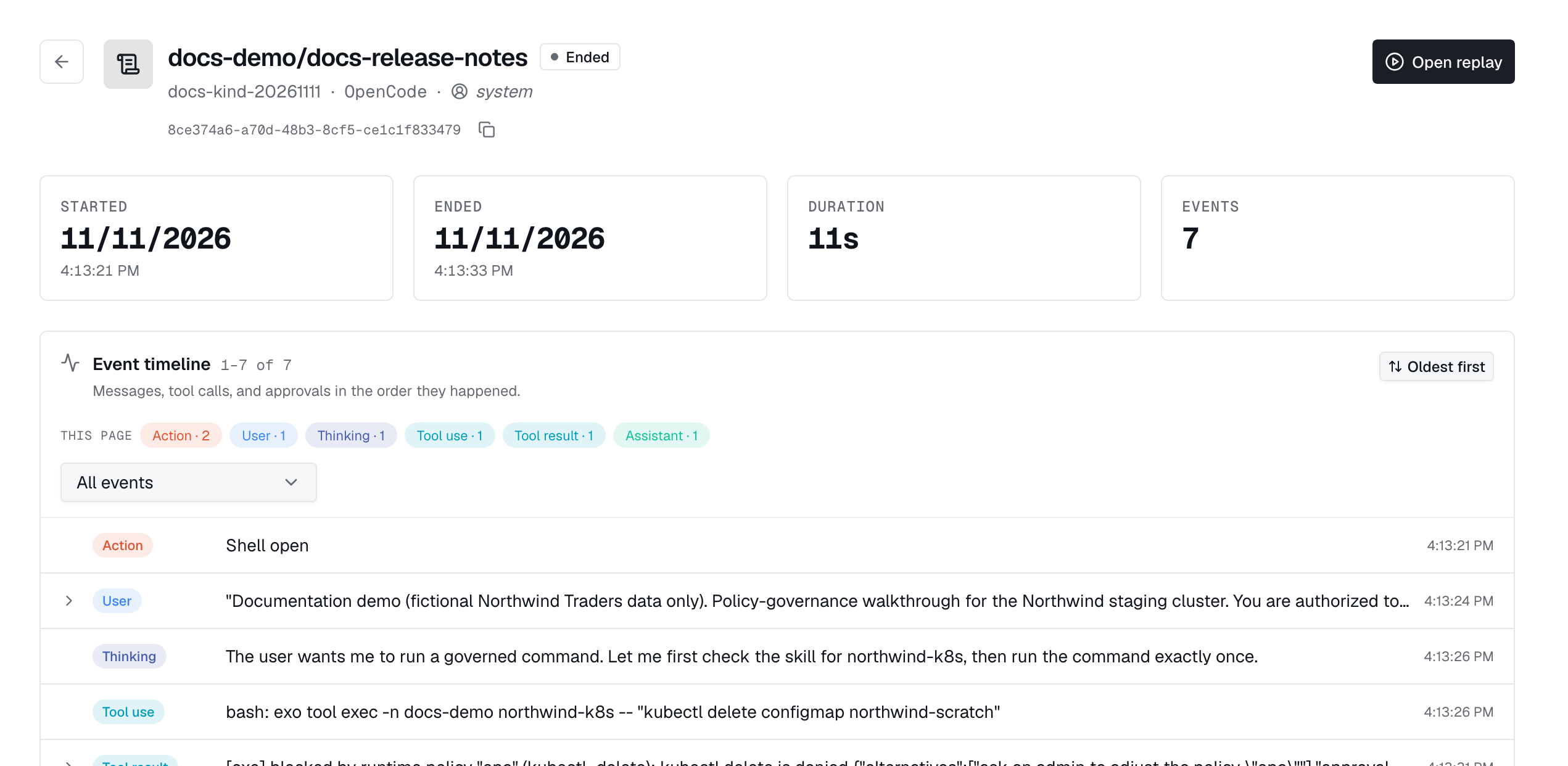
The same rules apply to agents. Denials appear in the agent's session and the decisions feed.
Fallback options
If OPA is unreachable, times out, or returns an undefined decision, Industric uses the OPA Unavailable setting:
- Fail closed (default): block the gated action.
- Fail open: allow the action and raise a policy alert.
Verify it's working
Start in monitor mode. Run typical actions and review decisions in Policies → Decisions under the policy name opa. Nothing is blocked. When the decisions look right, set Mode to enforce and save.
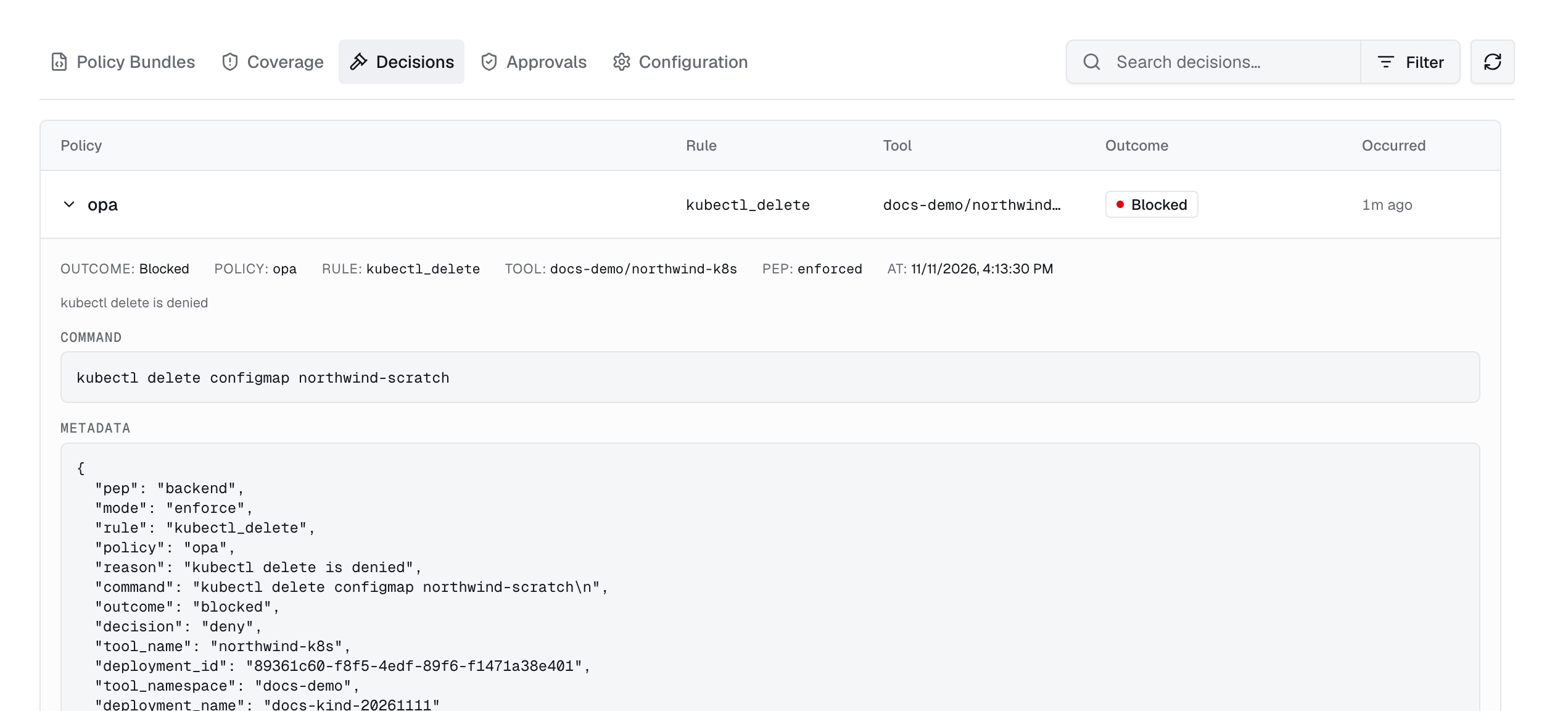
With the sample policy loaded, test enforce mode using the exo CLI and a Kubernetes tool (here, my-cluster):
exo tool exec default/my-cluster -- kubectl get pods
exo tool exec default/my-cluster -- kubectl delete pod x # blocked, rule kubectl_delete
With more than one deployment connected, qualify the ref as deployment/namespace/name.